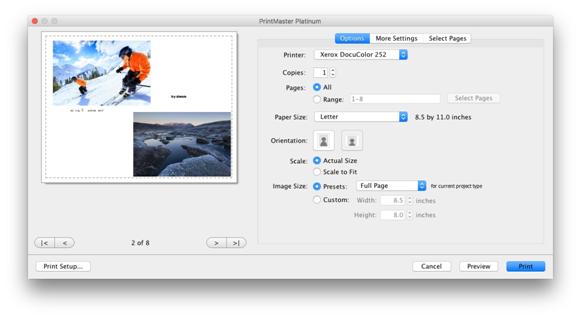
· Printer – Select a printer from the drop down of available printers.
· Copies – Enter a number for the number of copies you wish to print.
· Pages – Include all or selected pages to print.
· Paper Size – Select a paper size and type you wish to print on from the drop down.
· Orientation – Select a landscape or portrait option.
· Scale – Scale the image down to fit or print at actual size that may crop slightly.
· Image Size – Print the image at a preset or custom size that will fit on the page.
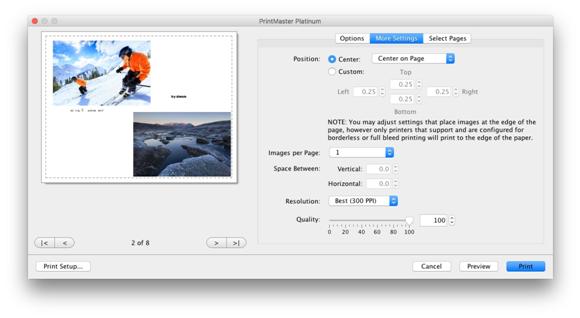
More Settings – Adjust the margins, position, images per page, and quality.
· Position – Choose where the image is placed on the page based on margins.
· Custom margins allow you to remove margins if your printer supports it to allow the image to print the full page edge to edge.
· Images Per Page – If you are printing a smaller card or label you can increase the number of pages that will fit onto a single sheet.
· Space Between will allow you to separate image / label spacing on the printed page.
· Resolution – By default it will print at the highest resolution but you may lower it.
· Quality – By default it will print at the highest quality but you may lower it.
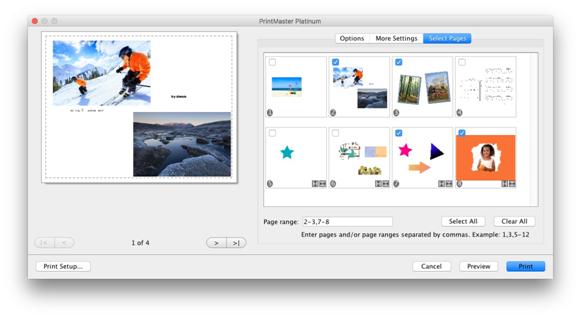
Select Pages – Select which pages
to print.
· Pages with the check box in the upper left are selected for printing.
· The Select All button will mark all pages for printing.
· The Clear All button will clear all pages from printing.
· You may mirror or flip pages by clicking on the small grey arrows.
Related Topics